Participants can enable WhatsApp notifications at two points: during registration on the platform or later, in Account Settings. With notifications on, you receive alerts about new activities and other updates from your community.
Contents
During registration
When you create your account, the Add your WhatsApp step asks for your cellphone number. Select the country code, enter the number and click “Validate”.
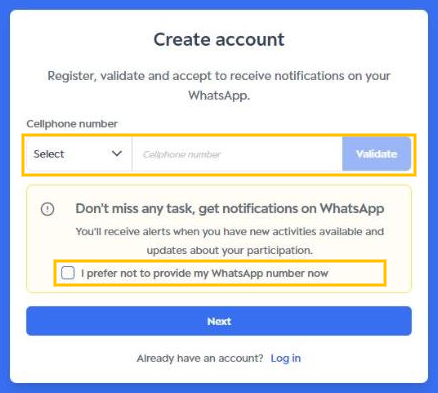
You will receive a code on WhatsApp at the number you entered. Type the code in the field shown to complete the validation, then click “Next”.
If you prefer not to provide your number now, check “I prefer not to provide my WhatsApp number now” and click “Next”. You can enable notifications later in Account Settings.
To see every registration step, read First Access - Participants.
In Account Settings
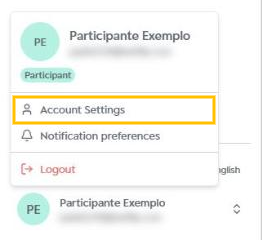
If you already have an account, click your photo or initials in the bottom-left corner of the side menu and select “Account Settings”.
Until your number is validated, the New! Complete your profile notice is shown at the top of the page. In Cellphone number, select the country code, enter the number and click “Validate”.
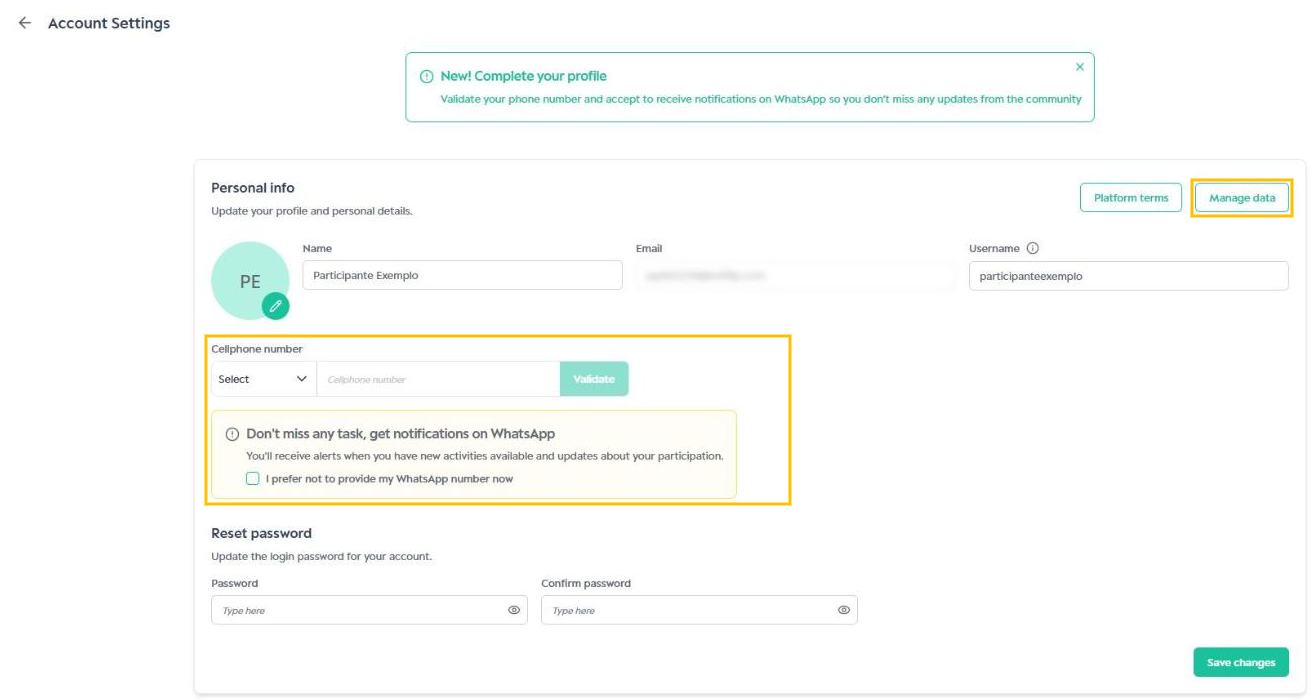
Type the code you received on WhatsApp to validate the number and click “Save changes”. Done! You will now receive notifications on WhatsApp.
Choose which notifications to receive
From the same menu under your photo, select “Notification preferences”. In the WhatsApp column, check or uncheck the notification types you want to receive and click “Save changes”.
While your number is not validated, the page shows the WhatsApp notifications are turned off notice and the WhatsApp column cannot be changed. Some email communications are required to take part, and each community can turn off certain notification types. See the full list in WhatsApp notification templates.
Disable notifications
To stop only some alerts, uncheck those types in Notification preferences and save.
To turn off all WhatsApp notifications, go to Account Settings, click “Revoke WhatsApp Consent” and then “Save changes”. You can turn them back on at any time by validating your number again.
Remember to keep an eye on the community so you don’t miss new activities: WhatsApp messages are there to make this easier.
Was this article helpful?
That’s Great!
Thank you for your feedback
Sorry! We couldn't be helpful
Thank you for your feedback
Feedback sent
We appreciate your effort and will try to fix the article